 This program lets you mass rename files, even whole directory structures recursively. Scanning for foreign diacritics (accented language characters) and replacing all of them with their English substitutes! Here is little more on why I wrote the software, screenshots, and download links...
Not that long ago I run into a little problem. Born in former Czechoslovakia I had many Czech and Slovak mp3 files, movies and books on my hard drive and almost all these files were using our diacritics and were accepted. MS Windows and some Linux installs are known to have some issues with accents, but they handle it mostly well.
Anyhow, the problem for me started when I bought a new D-LINK DSM-320 Wireless Media Player. It lets me stream Music, Photos, Slideshows, and Videos from my PC's hard drive to TV using an 802.11g wireless connection.
Well, all would be fine, except, it wouldn't display properly any foreign characters. So not only my Czech and Slovak files wouldn't be almost unreadable, but also some Turkish, Hungarian, Polish, Romanian, Slovene, Serbian (Romane) and other files wouldn't display properly.
I needed something, some kind of a software which would replace foreign characters with their English counterparts, in all files and folders on my hdd (or in the folder I specify), so I don't have to do this manually.
So for example:
Slovak Letters like :
Letter Letter name
A a á
Á á dlhé á
Ä ä prehlasované á; a s dvoma bodkami; široké e
B b bé
C c cé
Č č čé
D d dé
Ď ď ďé
DZ dz dzé
DŽ dž džé
E e é
É é dlhé é
F f ef
G g gé
H h há
CH ch chá
I i í
Í í dlhé í
J j jé
K k ká
L l el
Ĺ ĺ dlhé el
Ľ ľ mäkké el
M m em
N n en
Ň ň eň
O o o
Ó ó ó
Ô ô ô
P p pé
Q q1 kvé
R r er
Ŕ ŕ dlhé er
S s es
Š š eš
T t té
Ť ť mäkké té
U u u
Ú ú dlhé ú
V v vé
W w1 dvojité vé
X x1 iks
Y y ypsilon
Ý ý dlhý ypsilon
Z z zet
Ž ž žet
would be changed to: A a A a C c D d E e I i L l L l N n O o O o R r S s T t U u Y y Z z
anyhow, you get the point...
I couldn't find anything on the net, so I wrote the program myself. I am giving it out, free of charge, in case someone comes accross the similar diacritic related issues and needs to mass rename the files and folders.
I wrote it in VB.NET 2005 and you will need to have Microsoft Framework 2.0 installed in order to run it. I am planning to convert this to HTML and JavaScript.
So, in case it doesn't work, here is the link to: Microsoft Framework 2.0 Download
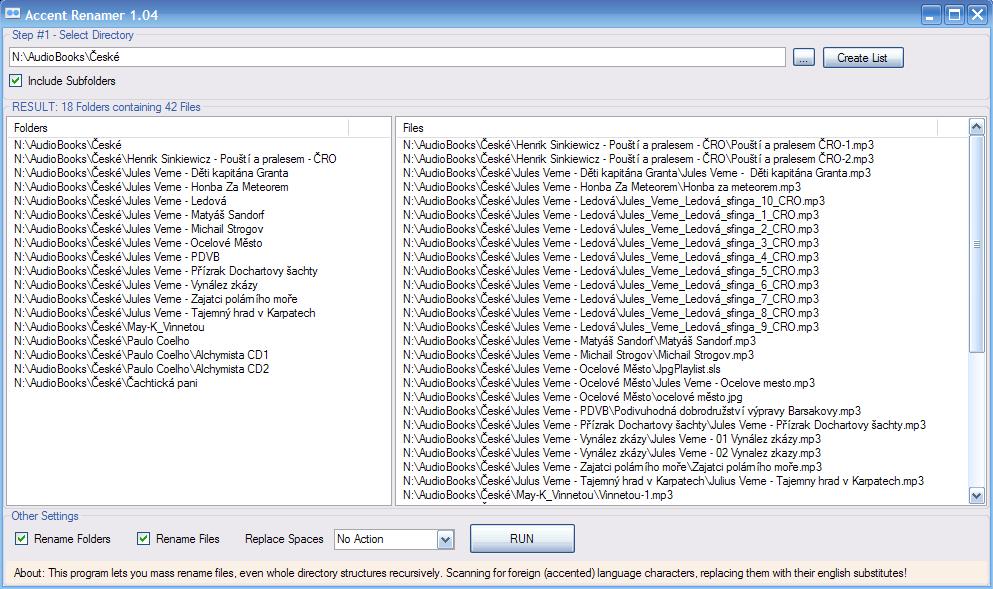
Anyhow, to get little better idea, how this works, here is a screenshot before processing:
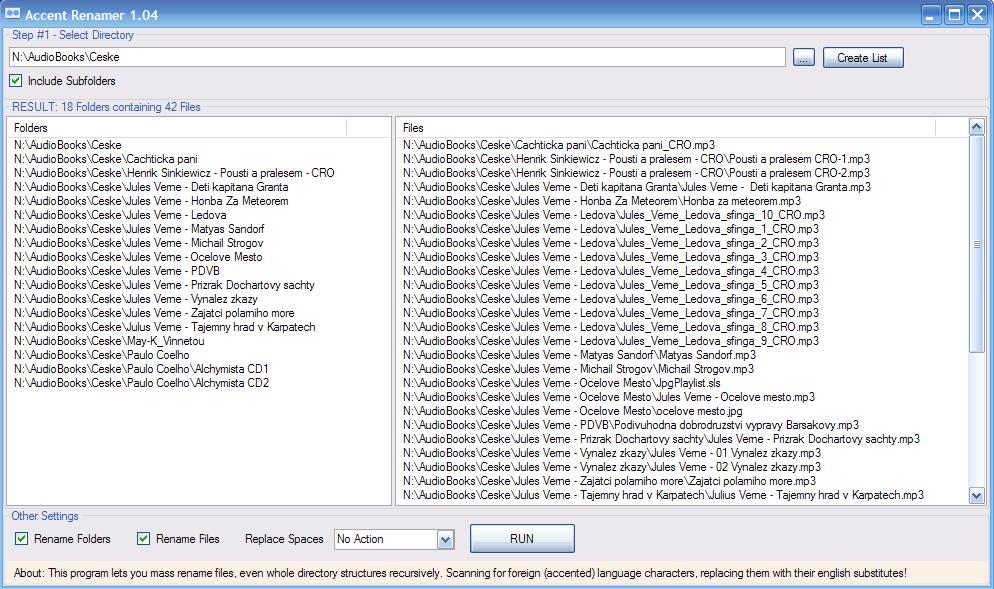
And here, after it processed the files and folders & replaced all foreign characters with their English substitutes:
If you want to download the program, here is the link to a zip file: Accent Renamer - 1.04 (60kb - zip)
and here the same thing, but in the rar format: Accent Renamer - 1.04 (37kb - rar)
So good luck and if someone wants to look at the source code, just drop me a line...
PS. I have tested the program only on my Windows Xp SP2 machine... considering I didn't spend much time writting it, there could still be some bugs.
If you like this program: Click here to DIGG IT
Or if you feel like program was helpful, click here:
 DONATE NOW
--
You can also use online version of the program, which I've created for this purpose: http://joe0.com/tools/